
The Thin Cheesecake release is out (v0.6.1)!
sudo gem install thin
That tasty and sweet Cheesecake release comes with some new sweet topping: config file support, uses less memory, some speed tweaks, but that’s nothing new regarding what we all know and use from other web servers. Nothing very innovative, breath taking, crazy, revolutionary or surprising you say.
You’re right!
Almost …
There’s another feature that as never been seen amongst Ruby web servers (indeed, haven’t found any that does that). But first, lets explore the typical deployment of a Rails app.
Let’s deploy Rails shall we?
Typically you’d deploy your rails application using mongrel like this:
mongrel_rails cluster::configure -C config/mongrel_cluster.yml --servers 3 --chdir /var/www/app/current ...
mongrel_rails cluster::start -C config/mongrel_cluster.yml
Then on your web server / load balancer configuration file (Nginx in this case):
nginx.conf
upstream  backend {
  server   127.0.0.1:5000;
  server   127.0.0.1:5001;
  server   127.0.0.1:5002;
}
Now with Thin, it’s the same
thin config -C config/thin.yml --servers 3 --port 5000 --chdir ...
thin start -C config/thin.yml
That will start 3 servers running on port 5000, 5001 and 5002.
And your web server configuration stays the same.
Really, between you and me, is Thin really really faster?
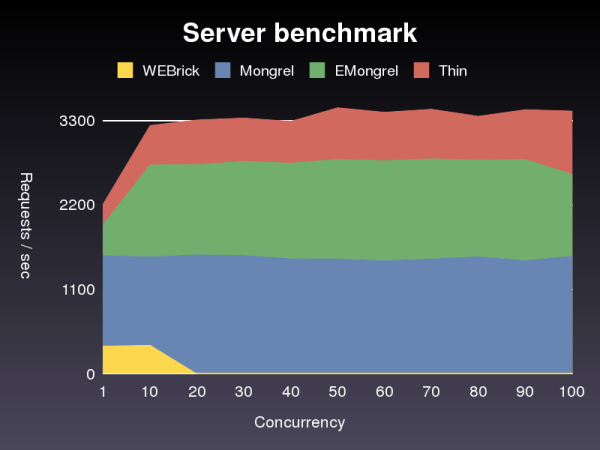
Simple “hello world” app, running one server
And uses less memory too:
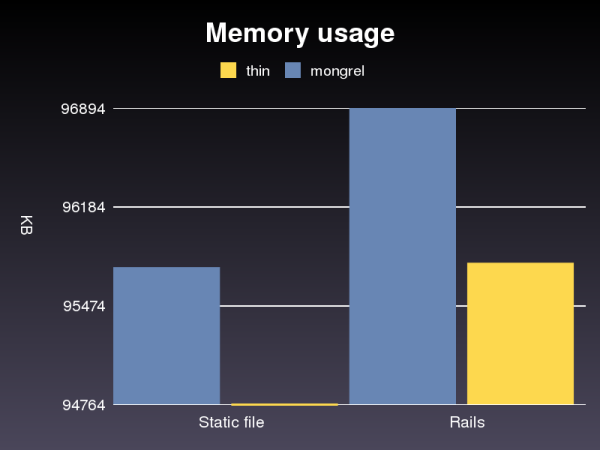
Mesured after running: ab -n5000 -c3
What about that new, crazy, amazing feature you mentioned?
Ever wanted to keep closer to you web server? Sometimes connecting through a TCP port on 127.0.0.1 feels a bit … disconnected. What if we’d get closer to it, get intimate with it, share some feelings, exchange toothbrush?
Introducing UNIX socket connections
When using more then one server (a cluster) behind a load balancer, we need to connect those servers to the load balancer through dedicated ports like in the previous “Let’s deploy Rails” section. But this connect the 2 using a TCP socket which means, all requests have to go though the network interface stuff twice! Once from the client (browser) to the load balancer / web server and again to the backend server.
There’s a better approach to this. Some load balancer (like Nginx) support connecting to a UNIX domain socket.
nginx.conf
upstream  backend {
  server   unix:/tmp/thin.0.sock;
  server   unix:/tmp/thin.1.sock;
  server   unix:/tmp/thin.2.sock;
}
Then start your Thin servers, like this:
thin start --server 3 --socket /tmp/thin.sock
And yes, it is faster:
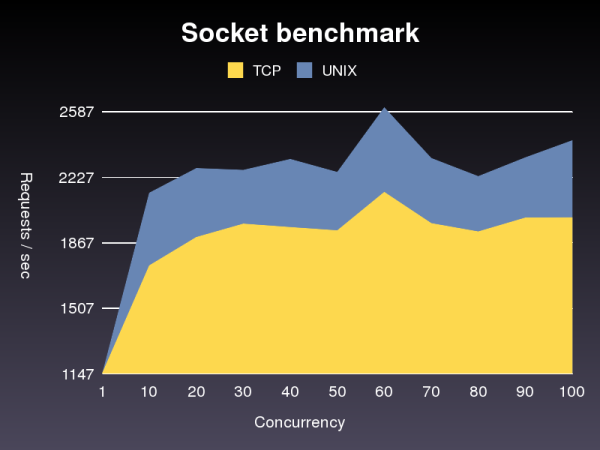
3 servers running a simple Rails application, behind Nginx


 Marc-André Cournoyer's blog
Pingback: 海綿般大男孩 » Blog Archive » 令人驚艷的thin6.1
This looks really cool. I’m curious, why is it that the req/sec when you compare TCP & UNIX sockets tops out lower (2500) than when you are comparing the different server types. What is the difference in the setup?
Pingback: Thin Ruby server is out. Fastest of them all. : JP on Rails
Hi Charles,
The first benchmark was done with a simple “hello world” app with only one Thin, no balancer in front.
The second one was done behind a load balancer with a very simple Rails application.
The second one is slower because it has to go through the balancer and all the Rails stuff. For a very simple application that takes very little time to run, having a no load balancer is faster.
Nice work! The numbers in req/s are quite impressive, but you should not “fix” charts 2 and 3 by using an arbitrary scale for the y-axis.
Especially the difference in memory usage is misleading since you’re reporting a 1MB difference, which is only little more than 1 percent in your example.
(BTW, 100 Megs for 3x ‘hello world’ rails apps seems like a lot.)
Hi Marc-André,
Since the purpose of Thin is perf, it would be great if you could bundle your hello-world app or simple Rails apps that you use to test with. (or at least make them available.)
This way if one of us wants to test some changes we’ve made to see how it impacts the benchmarks, we can compare them against your published results.
It would also help us to isolate what kind of perf gains we see from Thin vs. running on a different HW, etc.
Looking really good tho. Event-driven is the way to go!
@michael: I know 100MB is a lot, most of this is used by Rails I guess. Both Mongrel and Thin use the same memory for Rails, the difference is in the amount of memory used by the web server, which is a lot less then 100 MB and more then 1% gain. I’ll try to do a benchmark w/ just a simple Rack hello world app next time.
@charles: The benchmark scripts are in http://github.com/macournoyer/thin/tree/master/benchmark
Run w/: ruby simple.rb 1000 [print |graph]
You need to install Gruff gem to output to graph.
Thin purpose is not only perf, also simplicity and ease of use.
Let me know if you need help running the benchmarks and thx for the comments!
oh and the rails app I used is under /spec/rails_app
Seems like there will be official support from merb “soon”
http://yehudakatz.com/
“Merb Core is also based on a Rack adapter now, so it’ll work out of the box with Mongrel, Evented Mongrel, FCGI, regular CGI, thin, webrick, and Fuzed, as well as any server you can write a rack adapter for. “
yes Twinwing, Thin support will be built in the “new” merb-core, and looks like it’s very fast: http://twitter.com/ezmobius/statuses/604439482
This is kinda off topic but how does Nginx compares to Lighttpd? Never really played with it…
Do you guys plan to use Thin on your production servers in the foreseeable future? As always, great job! 🙂
I’m kind of surprised that only now have people tried to use Unix sockets instead of TCP sockets. It should be common knowledge that Unix sockets are quite a bit faster… or at least I thought it is common knowledge.
@denis: seems like lighttpd and nginx perform similarly for serving static files (http://superjared.com/entry/benching-lighttpd-vs-nginx-static-files/) but nginx is faster as a load balancer and uses less memory (lighttpd has memory leaks) (http://blog.kovyrin.net/2006/08/22/high-performance-rails-nginx-lighttpd-mongrel/). More pros and cons here http://hostingfu.com/article/nginx-vs-lighttpd-for-a-small-vps. And yeah I hope we can switch to Thin at standoutjobs when we get time to, which is not right now 🙂
@hongli: I know Fastcgi can bind to UNIX sockets, but I haven’t found any HTTP server that can. Yeah kinda surprising. But a couple ppl mentioned that connecting to the loopback address using TCP was the equivalent of UNIX socket on some system. I haven’t seen this behaviour though.
Wouldn’t nginx be able to bind to fastcgi through a socket? Just like how thin will?
Anyways, here is a compiled page of differences for mongrel & thin:
http://www.wikivs.com/wiki/Mongrel_vs_Thin
And a short list of differences between nginx & lighttpd:
http://www.wikivs.com/wiki/NGINX_vs_ligHTTPd
@david: yes and I think that’s the de facto choice for deploying PHP w/ nginx. But fastcgi is not a web server. So to my knowledge Thin is the first web server to be able to listen on a UNIX socket. Let me know if I’m wrong.
Thx for putting those wiki pages up, very nice!
I’m not sure if this anyone has tried, but
http://www.fastcgi.com/mod_fastcgi/docs/mod_fastcgi.html seems to indicate that static fastcgi “servers” can indeed use unix sockets.
And if you have any good updates, please update the WikiVS comparisons as well. You’re the one who knows Thin’s advantages the best! 🙂
Pingback: lucasjosh.com » Blog Archive » Links for 1/30/08 [my NetNewsWire tabs]
@david: I think my answer wasn’t clear enough, I said: yes you’re right, FastCGI CAN bind to unix socket.
I take note to update your page (can I write Thin is faster then a jet plane?).
The Thin Ruby server is cool but it’s not faster than Wuby (wuby.org), my wittle wuby web server.
I challenge Thin(and Mongrel) to a duel! 🙂
Wuby consists of a single (self-contained), open source ruby file (12k) with no config files and it even includes an Amazon-like simple DB hashing framework built-in. This allows you to deploy a Ruby web application without a database or other web server software (such as Apache, Mongrel, Webrick, or Lighttpd). You can, however, assign wuby a port id and direct traffic to it from other servers.
Wuby.org has been running solid on Wuby (without a restart) since it’s debut on Ruby Inside on November 19th – http://www.rubyinside.com/wuby-another-light-weight-web-framework-for-ruby-654.html
Let the duel begin 🙂
hey Chris, thx for stopping by!
No doubt Wuby is thinner then thin. All this in one ruby file is pretty impressive. But still, Thin is ~800 LOC and Wuby is ~500 LOC. And I’d be very surprised that wuby can be faster then thin because wuby still uses threads and ruby tcpserver like mongrel do. But I think your server could be faster then mongrel indeed.
I did some quick benchmarks serving a simple static file:
ab -n5000 -c3
wuby: 1363.33 req/sec
thin: 2676.57 req/sec
ab -n5000 -c100
wuby: crashes after 1299 requests
thin: 3561.92 req/sec
nice try 😉
also you should fix that directory traversal security hole, I can:
curl http://localhost:8080/../../../../etc/passwd
It would be interesting see Wuby vs. Thin results with no caching and a ruby script compared rather than a static file…
Pingback: The Flexible Thin Anorexic Gymnast that Democratized Deployment « Marc-André Cournoyer’s blog
Pingback: Staying Alive with Thin! « Marc-André Cournoyer’s blog
Pingback: 赖洪礼的 blog » The hidden corners of Passenger
Pingback: Nome do Jogo » Artigo » Rails Podcast Brasil - Episódio 15
How about haproxy & varnish!
http://rubyworks.rubyforge.org/manual/haproxy.html
Pingback: Thin próximo da versão 1.0 » Pomo T.I
how to i pass thin sockect to apache mod_proxy is it possible ?
Yes Nginx + Thin is very good with UNIX sockets!
But with UNIX sockets appears some problems – all ERROR reportings now showing in browser. So when used UNIX sockets, rails application can not find native templates (/404.html, /422.html, 500.html)
I have to say, I could not agree with you in 100%, but that’s just my IMHO, which could be wrong.
p.s. You have a very good template for your blog. Where have you got it from?
Pingback: Superблог компании LOCUM | Выбор сервера приложений для rails
Pingback: Phusion Passenger & running multiple Ruby versions – Phusion Corporate Blog
Интернет магазин прикольных футболок. Наши прикольные футболки купили более 1 млн. покупателей.
В каталогах нашего сайта ежедневно появляются новые прикольные майки, который вы сможете купить по самой доступной цене.
Заказать футболку можно в любую точку России. Чтобы купить футболку, нужно сделать всего пару кликов, оформить заказ и ждать прибытия товара.
Все футболки проходят предварительный контроль качества, цена футболки формируется от вида нанесения и способа доставки.
Посетите наш магазин – корректирующая майка корсет
I just added your blog to my blog roll, I hope you would take into consideration doing the same.
Рост ресниц карепрост заказать
Appreciation to my father who shared with me on the topic of this website, this webpage
is genuinely amazing.
Pingback: How to restart standalone socket proxyied Passenger after a capistrano deploy - Dynamick